|
No.
|
User-Oriented
Description
|
Developer-Oriented
Description
|
|---|---|---|
|
1.
|
Language
used in communication between computers. This language restricts what
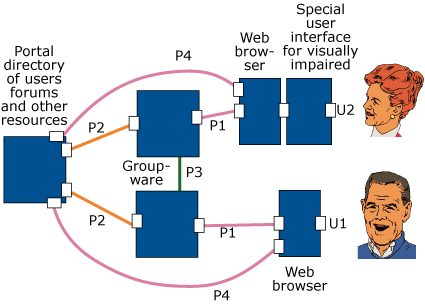
two computers can say to each other.
|
Protocol
|
|
2.
|
A
name is globally unique, if no two objects can have the same name. For
example, postal address, phone numbers and e-mail addresses are globally
unique.
A
disadvantage with globally unique names is that they have to be longer
and more complex than other names.
Phone
number example:
Not
globally unique: 16 16 67
Globally
unique: +46-8-16 16 67
E-mail
example:
An
e-mail might have a header:
"To: John Smith <jsmith@dsv.su.se>"
In
this example, "John Smith" is not globally unique, but "jsmith@dsv.su.se"
is globally unique.
|
Globally
unique
|
|
3.
|
The
while and yellow pages of the telephone directory are examples of directories.
Directory systems are computer systems, which allow users to find information
in directories. Examples of directories in Senior Online are directories
of (1) e-mail addresses and other information about users, (2) forums,
with information about how to find and join forums.
In
Senior Online, we have used the word "portal" for a directory
systems. But it might be better to use the term"directory system" since"portal
" implies an entry point, and a user may not always want to enter Senior
Online through the directory system.
|
Directory
system
|
|
4.
|
There
is no single product which can provide all the functions of Senior Online.
Senior Online will provide its services by combining different existing
and newly developed products. These products should work together in
such a way that Senior Online will appear as a single, integrated product
to its users. By "architecture" is meant how these products
relate to each other. Example: A user of an e-mail product may need
to look up the e-mail address of some person. The e-mail product can
then perform this look-up in a directory product. The architecture then
specifies that the e-mail product can connect to the directory product.
|
Architecture
|
|
5.
|
By
security is meant protection agains various kinds of risks. Examples
of risks are that someone gets hold of your private e-mail, or that
someone writes a false message in your name. Tools to provide security
can be names and passwords (identification), or lists of who is allowed
to do what (authorisation).
High
security costs money to develop, and often also makes systems less user-friendly.
For example, forcing users to repeatedly use different passwords can
give higher security. Even higher security can be achieved if users
have to use special devices, such as "smart cards".
Since
higher security has both advantages and disadvantages, we should decide
on an appropriate level of security in Senior Online.
|
Security
|
|
6.
|
The
doorstep is the first page or pages which a user sees when connecting
to Senior Online. There can be different doorsteps for new and experienced
users, and doorsteps which lead more directly to a particular service
than the main entrance.
|
Entry
point
|
|
7.
|
The
standard which a web browser uses to download web pages.
|
HTTP,
Hypertext Transfer Protocol [4], [5].
|
|
8.
|
The
standard used for sending Internet e-mail.
|
SMTP
and MIME [7], [8], [9].
|
|
9.
|
A
forum is an area of messages, and a group of users who can read and
write these messages. Since the messages are stored in the computer,
they can be written by one person at one time, read by another person
at a later time, and read by yet another person at an even later time.
Such communication systems are non-simultaneous (different-time)
.
|
Forum,
Non-simultaneous , Different-time.
|
|
10.
|
A
chat system is a system which allows groups of users to discuss at the
same time, by sending short messages or lines to each other. All the
messages sent during a chat can be saved in a transcript of the chat.
Note that chat requires users to be active at the same time. Such systems
are simultaneous (same-time) .
|
Chat
|
|
11.
|
Product,
which provides different services to support groups of people and their
interaction. Forums and chats are commonly occuring functions in groupware
products.
|
Groupware
|
|
12.
|
A
user tells the computer who the user is. Log in can be combined with
a password, to stop people impersonating other people. Log in can also
use smart cards and other advanced methods for identification, which
are even more secure than passwords, but which may be more difficult
to implement and use.
|
Log
in, identification, authentication [17].
|
|
13.
|
Senior
Online users can use forums, send and receive e-mail and participate
in chat sessions.
|
The
Senior Online Groupware provide services for e-mail, forums and chat.
|
|
14.
|
Senior
Online users can use directories of users, forums, web pages and other
information. They can find information by textual search (example "Find
the e-mail address of John Smith)". They can also find information
in some directories by following links from topic to subtopic, for example
first following a link to "Botany", and then from"Botany"
following a link to "Tropical flowers".
When
searching directories, users can indicate that they want to search only
that part of the directory, which is in a particular language, such
as English or German.
|
The
Senior Online directory system contains directories of users, forums,
web pages, Senior Online servers and maybe also forum contributions,
ratings and anti-spamming information. The directory can be searched,
and some directories also provide a hierarchical structure.
Separate
directories are provided for each language.
|
| 15. |
Part of the architecture of Senior Online:
|
|
|
|
Picture
of some of the products in Senior Online and how they may communicate
with each other.
|
P1
= Groupware user interface |
|
16.
|
The
communication between user and directory can be organised in two ways.
The users can either communicate directly with the directory, or they
can communicate indirectly through their groupware.
Example:
With direct communication, a user will click on a link to get to the
portal. With indirect communication, the user will give some instruction
to the groupware, so that the groupware will find information in the
directory.
Indirect
communication can be made more user-friendly, because different services
can be better integrated. Example of indirect communication: A user
is writing an e-mail message, and wants to find the e-mail address of
"John Smith". The user might write this name in a box on the
screen and push a button "Find". The groupware can then connect
to the directory and get a list of people with this name and provide
them to the user.
With
direct communication, the same example work so that the user has to
click on a link to open a window from the directory system, find the
e-mail address, copy it, go back to the groupware, and paste the e-mail
address.
However,
indirect communication is much more costly to develop, and we may not
have resources to develop it. Because of this, we propose that only
some basic functions can be done indirectly (searching for a user or
forum by name) but that other services, such as following a hiearchical
tree structure, require that the user connects directly to the directory
system (previously named "portal").
|
Issue:
Should users communicate directly with the directory (P4) or indirectly
through their groupware (P1+P2).
|
|
17.
|
Issue:
How high security should we provide? Can we allow that a spy, who is
able eavesdrop on the internet traffic, can see private information,
and can collect passwords and later impersonate a user. There are security
methods based on encryption to stop such eavesdropping, but they will
add considerable cost for the development, which might mean that we
will not be able to get other wanted functions ready.
A
compromise might be to use some encryption, for example let servers
identify themselves in a secure way, but otherwise use simpler security
methods.
|
Issue:
Should we use low (password) or high (encrypted) security.
|
|
18.
|
Cookies
are methods to help the server remember who the user is, so that the
user need not repeatedly give his name and password.
Session
cookies mean that the user need only give his name and password when
logging in. They may also, for security reasons, be limited to, for
example, 15 minutes. Persistent cookies are cookies which allows the
server to remember who the user is, when the user connects on another
day. Cookies are stored in the personal computer of a user. This means
that persistent cookies cannot be used on personal computers
used by more than one user.
Another
restriction with cookies are that cookies for one server cannot identify
a user to another server. This means that if a user has told the directory
system his/her name, they have to tell the same name again to the groupware.
There
are methods to avoid this problem, but they may give less security.
|
Session
cookies and persistent cookies.
|
|
19.
|
Must
a user tell his e-mail address to the directory system before clicking
on a link to a forum? For technical reasons, this is necessary. The
only way to avoid it would be that the user always communicates with
his groupware, and only indirectly with the directory system. But to
implement this 100 % requires maybe more development effort than we
can afford. Especially PVL has manpower problems because they have to
concentrate their resources on getting Web for groups ready and working.
|
Issue:
Must a user log in into the directory system. Log in without password
is enough, except if the user is an administrator. I have written an
e-mail to some developers describing a way to partially overcome this
problem. [1]
|
|
20.
|
Types
of forums:
Open
forum: Anyone can participate.
Closed
forum: Only allowed people can participate. A closed forum can be"open
" to some people, such as members of Seniornet Sweden. The name and
the description of the closed forums is however shown to non-members.
A
secret forum is a closed forum, whose existence is not shown to outsiders.
Moderated
forum: A moderator checks all contributions before they are shown to
the members of the forum. Advantage: Avoids unsuitable messages such
as spamming. Disadvantage: Delays the interaction speed.
A
forum can also be restricted so that only members can submit contributions
to it. Or it can be designed so that submissions by non-members must
be approved by the moderator.
A
forum can also be specified to allow/require anonymous or psudonymous
contributions.
Special
kinds of forums can be an advice column, to which people write questions
and get answers by an expert. The questions might in such a case be
anonymous or pseudonymous.
KOM
2000 also has even more special kinds of forums called "courses"
which include facilities for a teacher to give marks on what the students
write.
Which
types of forums do the users of Senior Online want. All of the above?
|
Access
control settings for seeing, reading and writing in forums.
|
|
21.
|
Issue:
Priorities of development of co-working functionality.
There is a priority issue in allocating the time for the developers of KOM 2000 and Web for groups. Should they develop better local groupware functionality (Local Forums and chats within one server) or should they develop the software for co-working between different servers. The software for co-working between servers makes it possible for a user of one groupware product running on one server, to find and join forums on other groupware servers. It also allows software on one server to find the e-mail address of users at other servers. This priority issue is most acute for PVL, since they are in the final testing stages of Web for groups, which is to be fully working in July. Possibly
elderly users will find local functionality of more importance. On the
other hand, in an EU project for co-operetion between countries, it
might be suitable to develop software which stimulates co-operation
between people in different countries.
|
Issue:
Priority of separate groupware development versus development of Portal
and Groupware protocol functionalities.
|
|
22.
|
This
is a very technical issue, but I will try to explain it from a user
point of view:
The
issue is how messages and contributions are to be forwarded between
groupware servers. For example, if a user in a server in Stockholm wants
to participate in a forum in Vienna, the contributions in this
HTTP
has the disadvantage that no other systems use HTTP for this particular
purpose. It has the advantage that it is easy to implement, gives fast
response times and can be used for all the functions we want.
NNTP
and SMTP have the advantage that they are already accepted standards
for sending messages. NNTP is currently used in Usenet News and SMTP
in e-mail. They both have the disadvantage that they do not support
all the functionality we may want. SMTP has the additional disadvantage
that it is somewhat slower. Delivery of a message may take 1-5 minutes,
this is too much to keep a user waiting. Thus, if we use SMTP, a user
on server A who wants to join a forum on server B, will not immediately
be able to see the contributions in the forum, if we choose SMTP.
Since
NNTP and SMTP do not give all the functions we want, we may want to
extend them for our needs. Examples of facilities not supported is to
get the list of members of a forum, to add and exclude members of a
closed forum, to support some types of forums.
NNTP
and SMTP has the advantage that we will implement them anyway, in order
to allow Senior Online users to participate in Usenet News and send
and receive e-mail. So choice of them may save development time.
NNTP
has an additional possible disadvantage in that it has its own naming
scheme for forum names, of formats like "sol.botany.arctical-flowers".
This may force existing groupwares, if they do not want to adopt this
naming method internally, to have duplicate names of forums. However,
also with other methods than NNTP, duplicate names may be needed, see
the issue below.
|
Issue:
Choice of protocol base for portal protocol. Choices: HTTP, NNTP, SMTP,
Corba.
|
|
23.
|
Issue:
Globally unique names of forums.
There
are two ways to ensure that forums have globally unique names.
(1)
One way is to do it the same way it is done in e-mail. The name of an
e-mail user might be:
John
Smith <jsmith@omega.at>
Here
John Smith" is not globally unique, but jsmith@omega.at" is globally
unique, because it combines a name part "jsmith" with a globally
unique name of the server "omega.at".
(2)
Another way is to use some kind of central data base to ensure that
names will be unique. NNTP has such a data base, and therefore does
not have to include names of domains to make the forum names unique.
In Usenet News, there is however a slight change that two new forums
by mistake get the same name, if more than one NNTP server is used.
We can avoid this problem by using one single NNTP server for Senior
Online.
|
Issue:
Globally unique names of forums.
|
|
24.
|
Again,
this is a technically detailed issue, but I will try to explain it from
a user's viewpoint.
LDAP
and HTTP are two standards which can be used as a base for communication
from the groupwares to the directory in Senior Online. LDAP has the
advantage that it is a standard designed for directory systems. This
means that if we choose LDAP, users will be able to use the LDAP functionality
built into other e-mail software than our own, to find people's e-mail
addresses. For example, someone using Netscape Mail, might use the LDAP
function built into Netscape Mail, in order to find the e-mail address
of a Senior Online user from the Senior Online directory. The main disadvantage
with LDAP is that it is more complex and expensive to implement.
|
Use
of LDAP or HTTP for the Portal Protocol. LDAP is a standard for communication
with directory systems, but uses a complex binary format called ASN.1-BER.
The
specification I have already written in [3] is based on HTTP, but it
will not be difficult to rewrite it to use LDAP, if that is our choice.
I
should prepare an example of how the same operation looks like using
LDAP and HTTP, as a basis for our discussion. I do not, however, have
time for this until after 16 June 1999.
|
|
25.
|
Issue:
Chat can not occur with some chat participants using KOM 2000 and some
using Web for groups.
To
allow this requires some additional development effort for both DSV
(KOM 2000) and PVL (Web for groups), and must be prioritized against
other services wanted by the users.
|
If
we want global chat, we should probably copy the protocols used by IRC,
or a subset of them, since IRC is the standard for distributed chat.
|